
26 August 2026 | By James Thomas
Four challenges every organisation must solve to adopt AI safely
Discover four key challenges affecting AI adoption and how organisations can build confidence in their approach.
Read more
By Shaun Farrow | 14 April 2025
Cyber defence threats are nothing new — just look at the Morris Worm, which infected 10% of all online machines back in 1988. But the damage they can cause today is on a whole different level.
With technology embedded in nearly every aspect of a business, a cyber attack can lead to millions in losses, legal backlash, and irreparable reputational harm. A prime example of this occurred in late 2024, when UK-based KNP Logistics Group was targeted by Russian ransomware hackers. The attackers wiped out substantial amounts of data including key financial records. Resulting the company being unable to secure credit and therefore forced to close after 158 years of operation.
Even worse, the risk is growing. In 2024, 50% of all UK businesses faced a cyber attack or security breach, up from 39% just two years earlier. So, how can you protect your business in an increasingly dangerous threat landscape?
The Bistech team has helped hundreds of companies strengthen their security posture. We know exactly what it takes to protect your organisation from cyber criminals. Keep reading for our breakdown of the top five steps you can take to boost your cyber defence, from getting started to advanced strategies.

It’s hard to strengthen your cyber defence if you don’t know what’s missing, so it pays to have a guide to work from. This is where a cyber security framework (CSF) comes in.
A CSF is a set of guidelines, best practices, and standards designed to help organisations manage and improve their cyber defence posture. It provides a structured approach to identifying, protecting, detecting, responding to, and recovering from cyber threats.
Comparing your current security posture to a well-established CSF will give you a clear picture of where you stand today, highlight what’s missing from your strategy, and provide a solid foundation to build on.
There are plenty of CSFs out there, each designed for different business sizes, industries, and levels of security readiness. Notable options include the National Cyber Security Centre (NCSC) guidelines, ISO 27001 Information Security Management, and the Network and Information Systems (NIS) regulations. As an example, we at Bistech follow the National Institute of Standards and Technology (NIST) Cyber Security Framework 2.0, an internationally recognised standard with a strong focus on governance and supply chain risk management. We’re also certified to ISO 27001:2022 and Cyber Essentials Plus.
If you’re new to CSFs, Cyber Essentials is a great place to start. This government-backed scheme helps your business guard against common threats like malware, ransomware, phishing, and unauthorised access, and is a requirement if you’re aiming for UK government contracts.
Along with aligning your security to a trusted framework, it’s also important to invest in security awareness training and continuous learning for your team. Since most cyber attacks happen due to human error, educating your team to spot and prevent potential threats helps create a ‘human firewall’ that offers protection beyond just the technical side of things.
A lot of businesses still rely on the traditional perimeter-based security model, which assumes anything inside the network is trusted. The issue is that modern networks aren’t just inside a company’s physical walls anymore; they extend to remote employees, cloud services, mobile devices, and third-party apps, introducing new security challenges the old model just can’t address.
Enter the Zero Trust model.
As the name suggests, Zero Trust operates on the idea that no one, whether inside or outside the organisation, should be trusted by default. Every request for access to resources, apps, or systems needs to be thoroughly verified before it’s granted, no matter where the user is or what device they’re using.
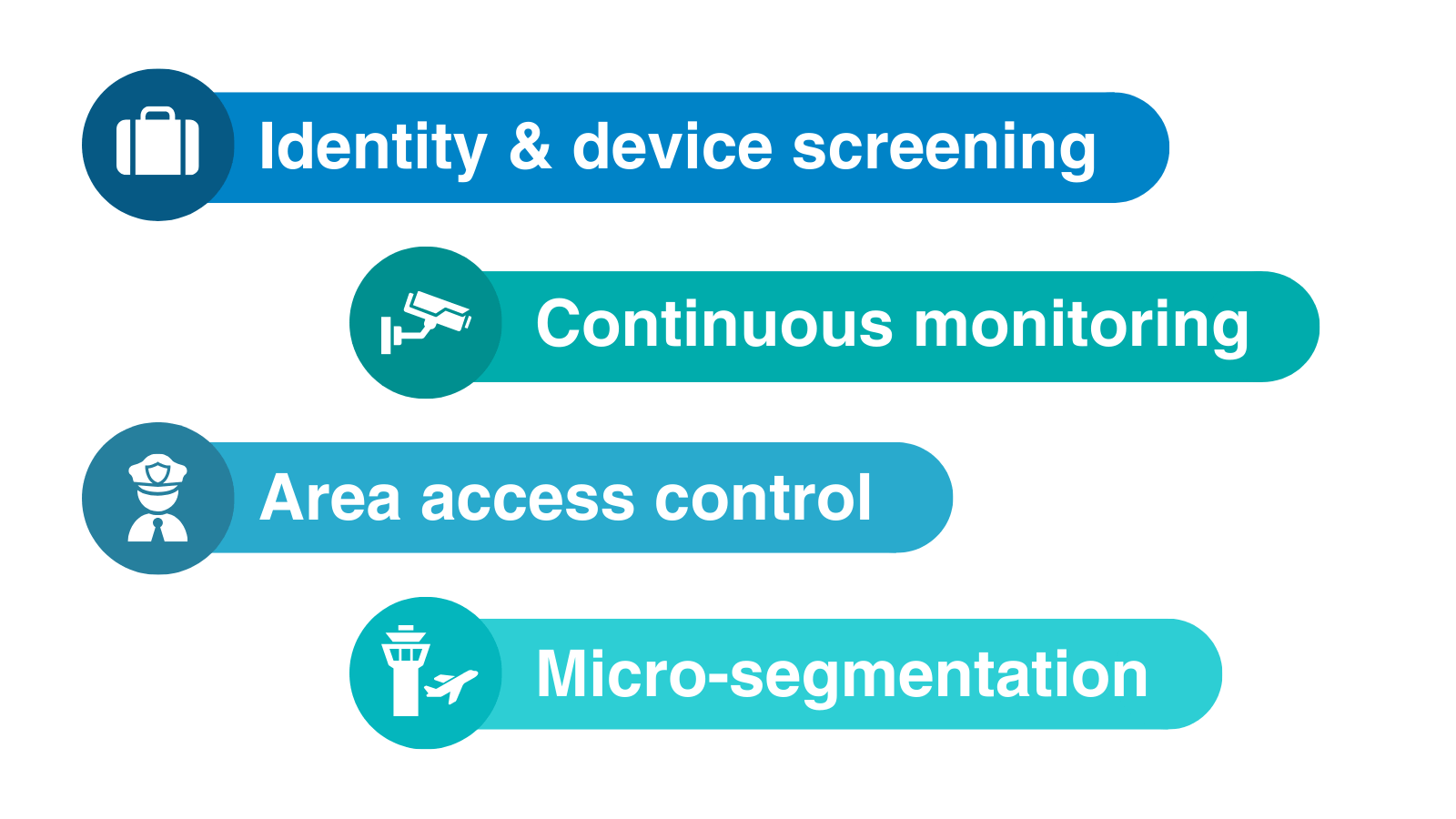
A common analogy is to compare a Zero Trust network to an airport, where every user or device trying to connect is like a passenger trying to get through security. Here’s a more detailed breakdown:
Just like an airline checks a passenger’s ID and scans their luggage for security threats before letting them enter, Zero Trust verifies both a user’s identity and device before allowing network access.
When someone tries to log in, their identity is authenticated, and their device is checked for compliance and security. Only after passing these checks do they get access.
In both the airport and the network, nothing is automatically trusted — even airport staff have to pass through restricted areas with badges and extra bag checks, just like how Zero Trust applies strict controls for users and devices already within the network.
Once travellers have passed through security, airports continue to monitor them with surveillance cameras, staff, and behaviour detection systems. Zero Trust also does this by constantly checking user behaviour, device health, and location logs to spot anything unusual. If an anomaly is detected, like an unexpected login from a different country, Zero Trust might ask for extra authentication, just as airport security might pull aside a passenger for further questioning.
At the airport, passengers are allowed to go only where they need to be, such as boarding their flight or going to a specific terminal. In Zero Trust, users and devices are granted access only to the specific resources they need to perform their tasks – this is called the principle of least privilege. It minimises the risk of a breach if one part of the network is compromised.
Just like how airports have different areas like security zones, terminals, and restricted access zones, Zero Trust involves dividing a network into smaller segments. If a part of the network is compromised, access is still limited to other segments.
By implementing a Zero Trust model in your business, you’ll create a strong layer of defence that helps stop bad passengers from boarding your system.

Gone are the days of connecting to a network solely through on-site desktops. Users can now access networks from a growing range of devices (including laptops, smartphones, and tablets), which makes working more flexible… at the cost of new security risks.
Every additional device, or “endpoint,” creates another potential entry point for cyber attackers. To keep your system secure, you need to use standard protections like antivirus software, data encryption, and firewalls, as well as Endpoint Detection and Response (EDR) tools.
EDR tools offer a range of advanced features that go beyond the basics, including:
EDR solutions are particularly useful in detecting advanced threats like ransomware, malware, or insider threats that traditional antivirus systems might miss.
However, as powerful as they are, EDR tools alone aren’t enough to fully secure your endpoints. They provide visibility and the ability to respond to threats, but they need to have trained professionals managing them; otherwise, they’re just collecting data that goes unnoticed. This is where managed security services like MDR and MXDR come in so useful — they offer 24/7 monitoring and support, so your EDR tools are used to their full potential.
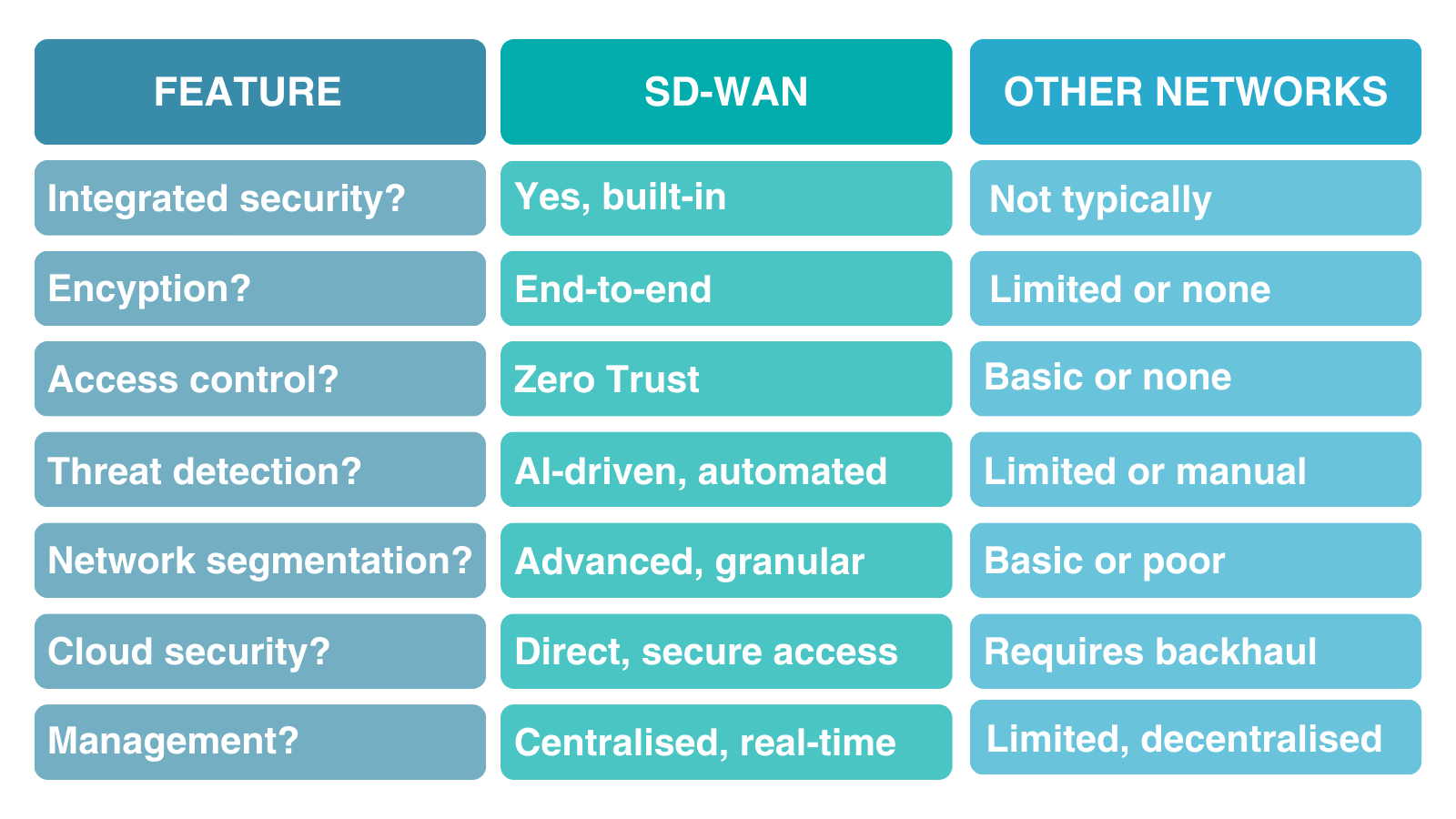
While traditional WANs have long been the standard, rising threats have made their security weaknesses more and more obvious. Because of this, many companies are now making the switch to SD-WAN.
SD-WAN comes with a range of security benefits that set it above traditional networks, including:
Upgrading to SD-WAN boosts visibility into your network traffic, helps prioritise critical applications, and allows for quicker responses to threats. Even better, it integrates seamlessly with your existing infrastructure, making the transition easier than you might expect.

No matter what prevention measures you’ve implemented, you should always have a solid Cyber Incident Response Plan (CIRP) in place.
Think of it like having a fire emergency plan. We all hope we’ve done everything possible to prevent a fire at work, but the reality is that there’s always a chance one could happen. It’s why we install fire alarms, sprinklers, and fire extinguishers, and why we do regular fire drills – just in case.
In 2024, the UK experienced around 7,000 workplace fires and 7.78 million cyber attacks. Despite cyber threats being 100,000 times more likely, only 22% of businesses have a formal CIRP in place.
Implementing a CIRP comes with countless advantages, including:
In short, a CIRP makes sure your organisation is ready if a threat slips past your defences, letting you respond quickly and improve security by applying lessons learned afterward.
Taking these steps will go a long way in strengthening your cyber defences and keeping your business safe, both now and down the line.
If you’re not sure how to get started, or wondering how else you can boost your security, the Bistech team is here to help. We’ve helped businesses of all sizes improve their security posture, from those new to cyber defence, to those with advanced strategies looking to cover all their bases.
If you’d like to see what we can do for your business, book a call with us today.
26 August 2026 | By James Thomas
Discover four key challenges affecting AI adoption and how organisations can build confidence in their approach.
Read more
13 August 2026 | By Mark Murray
Microsoft MFA is retiring. Discover why passkeys are becoming the new standard and the steps businesses should take before 2027.
Read more
30 July 2026 | By Louis Adams
Discover why patching management alone is no longer enough to protect against modern cyber threats.
Read more